
Excavator Lifting Capacity Chart: How to Read and Use One Safely
Could an excavator lift the same load at every reach and height? No. Its rated capacity depends on the machine’s exact configuration and the load’s position, so one maximum figure can be misleading. An excavator lifting capacity chart shows the rated load for specific lifting conditions.
If the chart looks difficult to interpret, start by matching it to the exact excavator and setup. Then compare its figures with the lift point and position you’re planning, and account for the conditions on site. This guide explains how to find the right chart, read capacity by lift radius and height, and gather useful details before arranging plant hire.
You’ll also learn why lifting over the front or side can change the rating, and how ground conditions and machine setup affect lift planning. Lifting operations in the UK must be properly planned by a competent person under LOLER. Rocket Rentals Ltd is a family-run plant hire business offering self-drive excavator hire and attachments, with an emphasis on inspection and considered equipment selection.
Table of Contents
What an Excavator Lifting Capacity Chart Shows
An excavator lifting capacity chart gives rated loads for specified machine positions and configurations. It shows the rating at defined combinations of reach and height, according to the manufacturer’s information for that excavator. The figures apply only to the conditions and setup stated on the chart, so they aren’t universal ratings for every task.
An excavator’s digging force, operating weight and bucket capacity describe different things. Digging force relates to the force used during excavation; operating weight is the machine’s weight in a specified setup; bucket capacity describes the volume the bucket can hold. None of these figures tells you the rated load for a planned lift. For a general overview of the machine and its components, see Excavator.
One headline capacity cannot represent every lift position because the charted rating changes with the load’s reach, height and the machine setup.
What do rated load, radius, and lift height mean?
Rated load is the load shown as the limit for a stated working position on the chart. Radius is the horizontal distance from the machine’s lifting reference point to the load. Lift height describes the load’s vertical position in relation to the reference stated by the manufacturer. Use the chart’s own definitions and reference points. Measuring from a different starting point can lead you to the wrong entry.
Why is there no single capacity number for every excavator lift?
Changing the reach or height changes which chart entry applies. The same load may fall within the rating at one position but exceed the charted limit at another. Machine orientation can also matter if the manufacturer gives separate ratings for lifting over the front or over the side.
The chart must match the excavator’s model and the configuration it identifies, including relevant setup details. Two machines that look similar may have different ratings, and the same model may have different chart information for different configurations. Don’t transfer a figure from another machine or choose a rating because its headline number looks suitable. Start with the manufacturer’s chart for the exact excavator, then find the entry that matches the intended lift position.
How to Read an Excavator Lifting Capacity Chart Step by Step
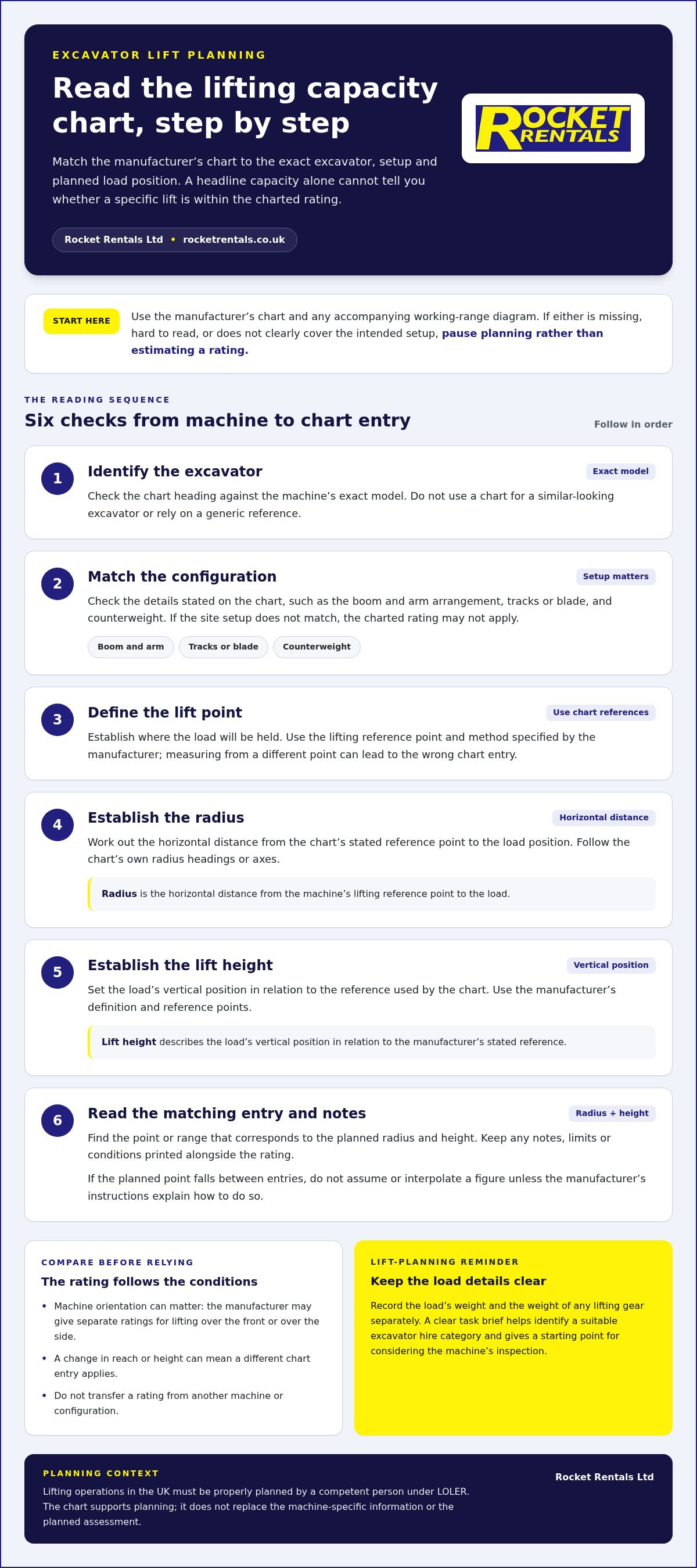
Work from the specific machine and planned lift, not from a capacity figure in isolation. Use the manufacturer’s chart and any accompanying working-range diagram. If either is missing, difficult to read or doesn’t clearly cover the intended setup, pause planning rather than estimating a rating.
Identify the excavator. Check the chart heading against the machine’s exact model.
Match the configuration. Note the boom and arm arrangement, track or blade setup, counterweight and any other details stated on the chart.
Define the lift point. Establish where the load will be held, using the reference point and method specified by the manufacturer.
Establish the radius. Work out the horizontal distance from the chart’s stated reference to the load position.
Establish the height. Set the load’s vertical position in relation to the reference used by the chart.
Read the entry and its qualifications. Find the point or range that corresponds to the planned radius and height. Keep any notes, limits or conditions printed alongside the rating.
Match the chart to the exact excavator and setup
Start with the chart heading. Confirm the model and select the page or section that describes the machine’s actual configuration. Where documented, check the boom, arm, tracks, blade and counterweight details. Don’t substitute a chart for a similar-looking excavator or rely on a generic reference. If the setup on site doesn’t match the chart, the rating may not apply.
Locate the correct radius and lift height
Use the same reference points and measurements as the manufacturer. Follow the radius and height axes on the chart, or locate the matching position on the working-range diagram, then read the corresponding rating. If the planned point falls between entries, don’t assume or interpolate a figure unless the manufacturer’s instructions explain how to do so.
A clearly labelled working-range diagram can make the relationship easier to follow. It should identify the machine reference point, load position, radius and height, without adding capacity values that aren’t in the manufacturer’s documentation. Keep the chart and diagram together so you can compare the planned position with the correct rating. For wider lift-planning context, consult the Construction Plant-hire Association’s official safety guidance.
If you’re preparing a hire brief, record the machine configuration and intended lift position alongside the chart entry you’ve used. This gives you a clearer starting point when considering self-drive excavator hire.
Which Conditions Change the Excavator’s Charted Lifting Capacity?
The rating you read applies only when the lift position and excavator setup match the manufacturer’s chart. Radius and height identify the relevant chart entry, while machine orientation and specified equipment details determine which rating applies. Use the table as a prompt for what to compare, not as a substitute for the machine-specific chart.
How do radius and height affect the chart reading?
Compare the entries for the planned load position. Don’t assume a rating from a nearby point will apply. A load at extended reach may correspond to a different charted rating from one positioned closer to the excavator. Height matters too: a point at the same radius but a different lift height may lead to a different entry.
A working-range diagram shows where the machine can position its lifting point. It isn’t, by itself, a rated-capacity chart. Use it to locate the planned position, then check the corresponding rating in the capacity information. If the point falls between chart intervals, don’t guess or interpolate unless the manufacturer explains how to read that situation.
How can configuration and lift direction affect the rating?
Check the chart for the orientation that matches the lift. Don’t assume a rating shown for lifting over the front also applies over the side. Match the track, blade and counterweight arrangement to the chart wherever these are specified. Check attachments and lifting points against the relevant manufacturer documentation. A similar-looking setup isn’t enough to establish that a rating applies.
The chart’s stated setup must match the planned lift before you rely on its rating. For UK lift planning, use guidance relevant to the equipment and task, alongside the manufacturer’s chart and documentation. The chart helps identify the applicable rated load, but it doesn’t replace the planning needed to assess actual site conditions.
What to Check Before Planning a Lift with an Excavator
A useful lift brief turns the chart reading into practical information for the task. Gather the details below before equipment selection and planning. If a load weight, measurement or chart condition is uncertain, pause and resolve it rather than estimating.
What information should you gather about the load and work area?
Load weight: Record it from reliable project information. Don’t judge weight by appearance.
Lifting gear: Note the weight of slings, chains or other gear separately from the load itself, so the planned lift accounts for both.
Load dimensions and lifting point: Record the load’s size and the point where it will be attached, using information suited to the planned lift.
Position and route: Set out the intended radius and height, plus the route the load needs to follow.
Work area: Describe ground conditions, available access and any space limits that may affect where the excavator can stand or move.
Chart source and setup: Keep the manufacturer’s chart for the exact machine with its model and configuration details, and note the conditions that apply to the rating.
These details help the person planning the lift assess the task as a whole. The excavator lifting capacity chart is one part of that picture: the load position, machine setup and work area must all relate to the chart conditions. If a measurement or chart entry is unclear, don’t fill the gap with an assumption.
How do you turn the chart check into an equipment brief?
Summarise the planned task so it can be compared with machine-specific information. Include the load weight and dimensions, lifting gear, intended lifting point, required reach and height, route, and site access and ground details. Add the excavator configuration shown on the chart, along with any attachment information relevant to the planned setup. This gives equipment selection a clear, practical basis.
Use the brief to identify an excavator category and configuration suited to the defined task, then keep the applicable chart with the lift-planning information. Clear machine selection and inspection are useful considerations when arranging self-drive plant hire. Rocket Rentals is a family-run business offering excavator hire and attachments for professional projects.
Ready to move from lift brief to equipment selection? Explore Rocket Rentals excavator hire.
Choosing Excavator Hire After Checking the Lifting Capacity Chart
Once you’ve defined the lift conditions, the chart can help shape a practical equipment brief. Use the required rated load, reach and height alongside the machine configuration shown in the manufacturer’s information. Then consider site access and working space. This gives you a clearer basis for selecting an excavator category for hire, without relying on a general capacity figure or assuming a similar machine will suit.
When should you compare excavator hire options?
Compare hire equipment against the task you’ve documented: the chart rating for the intended position, required reach and lift height, and the space available on site. Keep the machine setup central to the decision, including any configuration or attachments specified by the chart. A compact excavator may be worth considering where access is restricted, but its suitability for lifting still depends on its own chart and the planned lift conditions.
If compact equipment is under consideration, assess a mini digger as a separate equipment category against the same task brief. Don’t assume a smaller machine will meet the lift requirement simply because it can reach the work area.
What should your hire enquiry include?
Give a clear account of the job so equipment selection can be based on the actual site task. Include:
What you need to lift, its known weight and dimensions, and the weight of any lifting gear included in the planned lift.
The intended lifting point, working position, required radius and lift height.
Site access and working-space details that may affect machine placement.
The manufacturer’s chart details, including the excavator model and relevant setup.
Any attachment or lifting-point requirements, supported by the relevant machine documentation.
Rocket Rentals is a family-run plant hire business providing self-drive excavator and mini digger hire for professional projects. Inspection is an important consideration when choosing hire equipment, alongside a clear match between the machine information and your task. Sharing the chart and lift brief helps focus equipment selection on the requirements you’ve identified, without assuming a capacity that isn’t documented for the specific setup.
Planning a lift for your project? Contact Rocket Rentals to discuss suitable self-drive excavator hire.
Plan Your Next Excavator Lift with Confidence
An excavator’s lifting rating depends on its exact configuration and the load’s position. Use the manufacturer’s chart for the specific machine, matching the planned radius, height and orientation rather than relying on a headline capacity. A clear lift brief, including the load, lifting gear, work area and any documented attachment details, gives you a sound basis for equipment selection.
If you’re arranging plant hire, use that brief to compare the task with the excavator’s chart and site requirements. Rocket Rentals is an independent, family-run plant hire specialist founded circa 1988, offering self-drive excavator hire and excavator attachments. Equipment inspection is one of the company’s stated strengths, supporting a considered approach to selecting hire equipment.
Ready to discuss the machine for your project? Discuss excavator hire for your project with Rocket Rentals. With the lift details organised, you can take the next step towards selecting equipment that fits the planned task.
Frequently Asked Questions
How do you read an excavator lifting capacity chart?
Start by matching the chart to the exact excavator model and the configuration stated by its manufacturer. Identify the planned load position, then find its radius and lift height using the chart’s reference points. Read the corresponding rated load and any notes or conditions printed with it. Check the chart’s orientation and setup details too. If information is missing or unclear, pause and resolve it rather than estimating.
What does lifting radius mean on an excavator chart?
Lifting radius is the horizontal distance from the reference point specified by the manufacturer to the load’s position. The reference may be identified on the chart or an accompanying diagram, so use that rather than measuring from an assumed point. Radius helps locate the relevant rating alongside lift height. As the load’s position changes, the applicable chart entry may change too, so base your reading on the planned lift position.
Is an excavator’s maximum lifting capacity the same at every reach?
No. A machine’s rated load depends on the position and setup shown in its chart, so a headline maximum doesn’t apply at every reach or height. For example, the chart entry for a load close to the machine may differ from the entry at extended reach. Check the planned radius, height and machine orientation against the manufacturer’s information. Don’t use a maximum figure as a safe rating for a different position.
Can you use a lifting capacity chart from a similar excavator?
No. Use the manufacturer’s chart for the exact excavator model and configuration. Machines that look alike can have different specifications, and charts may be based on particular arrangements of components or equipment. A chart for a similar model doesn’t establish the rating for the machine on your site. If you can’t identify the correct chart or match its stated setup, pause lift planning until you have the right information.
Does an excavator lifting chart include the weight of the attachment?
It depends on the chart’s stated configuration and qualifications. Check the manufacturer’s documentation to see which attachment or setup the rating covers, and whether the planned attachment is included. Don’t assume a chart accounts for a different attachment, or that its effect can be worked out by guesswork. Include lifting accessories in the planned load details as well, and establish how the full arrangement relates to the applicable chart.
What should you check before lifting with a hired excavator?
Check that you have the manufacturer’s chart for the hired machine and its actual configuration. Gather reliable load-weight information, including the lifting gear, and establish the planned lifting point, radius, height and route. Consider site access and ground conditions as part of lift planning. If the weight, attachment details, working position or chart conditions are uncertain, stop and resolve them before proceeding. A competent person should plan the lifting operation.
Is digging capacity the same as lifting capacity?
No. Digging force describes the machine’s force during excavation, while lifting capacity is the rated load for a specified position and configuration. Operating weight and bucket capacity are different measures too: one describes machine weight, and the other the bucket’s volume. These figures aren’t substitutes for a lifting rating. For a planned lift, use the correct manufacturer chart and match its conditions to the machine and task.
Comments